Profiles
A profile is Headerly's top-level rule definition. An enabled, valid profile maps to one Chrome DNR rule.
Concept map
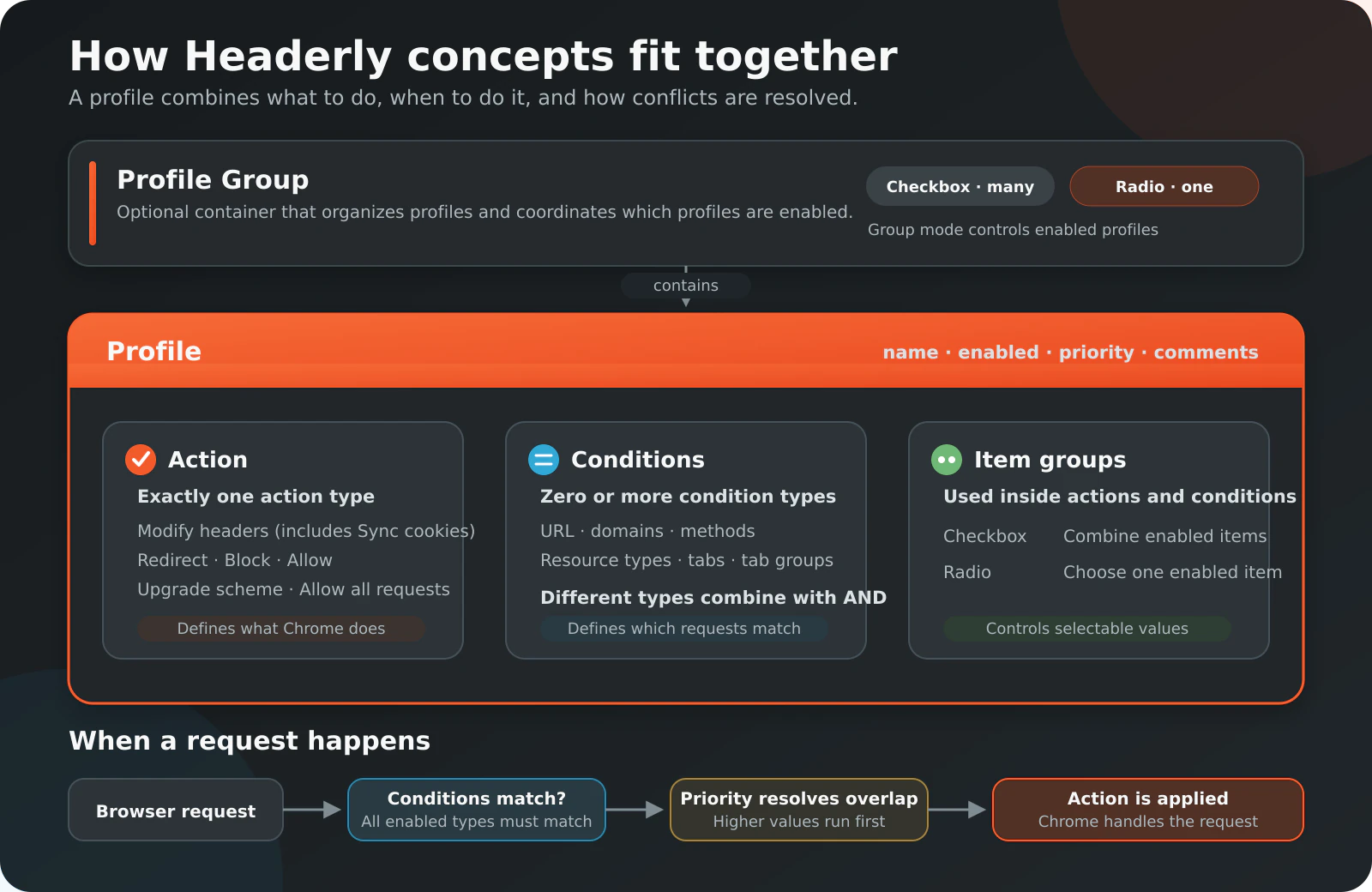
The diagram shows how Profile Groups, Profiles, Actions, Conditions, Priority, and item-group modes work together.
Fields
| Field | Required | Description |
|---|---|---|
| Name | Yes | User-visible profile name |
| Emoji | Yes | User-visible profile icon |
| Enabled | Yes | Whether Headerly should register the rule |
| Rule action type | Yes | One of the six supported actions |
| Priority | No | Integer from 1 to 2,147,483,647; defaults to 1 |
| Comments | No | Notes stored with the profile |
| Profile group | No | Membership in one top-level profile group |
| Actions | Depends on type | Header modifications, synchronized cookies, or redirect destination |
| Conditions | No | Request-selection criteria; none means global matching |
Lifecycle
Headerly creates, updates, or removes the associated DNR rule when rule-relevant profile data changes. Pausing a profile removes its rule. Resuming it registers the current configuration.
Valid actions
block, allow, upgradeScheme, and allowAllRequests require no additional action fields. modifyHeaders requires at least one valid header modification or synchronized cookie. redirect requires one enabled, non-empty destination.
Invalid rules are retained as profiles and display a registration error. See Registration errors.
Profile operations
Profiles can be paused, resumed, duplicated, deleted or reset, commented, assigned a priority, moved into a group, exported, and changed to another action type. Changing action type removes action data incompatible with the new type.
In the Sidebar, Shift+Click or middle-click a profile emoji to quickly toggle that profile's enabled state without opening it first.